The research on AI at work got a lot more honest this year. If you own an AI budget, it's worth reading closely, because the pattern underneath it is remarkably consistent.
Start with what CEOs say about their own programs. In IBM's 2025 CEO Study of 2,000 CEOs across 33 countries, CEOs reported that only 25% of their AI initiatives had delivered the expected ROI over the previous few years, and only 16% had scaled enterprise-wide. (IBM Institute for Business Value, May 2025)
MIT's number is harsher. A preliminary 2025 MIT NANDA report, drawing on interviews with 52 organizations and a survey of 153 leaders, found that just 5% of integrated AI pilots were extracting millions in value, while most showed no measurable P&L impact. (MIT NANDA, The GenAI Divide, July 2025)
Hold that one loosely. The authors call it preliminary, the figures come from interviews instead of company reporting, and the "95% of organizations" headline you've probably seen is broader than the data under it, which measures pilots and tools. What I'd take from it is the explanation. The authors don't blame the models. They say most of these tools don't learn and don't integrate well into the way people actually work.
Where AI made more work
There's a cost side too, and it lands on someone other than the person who used the tool. In a 2025 survey of 1,150 U.S. full-time employees by BetterUp Labs and the Stanford Social Media Lab, 40% said they had received AI-generated "workslop" in the past month, and they reported spending an average of 1 hour 56 minutes dealing with each instance. (Harvard Business Review, September 2025)
That's AI pointed at nothing in particular. Someone produces something that looks finished, and the actual work moves downstream to whoever has to fix it.
Where it paid off
The most useful study here measured behavior directly. In a Microsoft Research field experiment with 7,137 knowledge workers at 66 large firms, workers randomly given access to Microsoft 365 Copilot spent about 1.4 fewer hours a week on email after several months, and those who used it spent about 2 fewer hours. (Dillon et al., "Shifting Work Patterns with Generative AI," arXiv 2504.11436v4, 2025)
Email is a narrow, recurring job, and it's a big one. Microsoft's 2023 Work Trend Index found that, measured across Microsoft 365 apps, the average employee spends 57% of their time communicating in meetings, email and chat, and 43% creating. (Microsoft Work Trend Index, May 2023)
There's a second finding in that paper that gets less attention. Outside of email, the researchers didn't detect a shift in the mix of work people did. The time came back on the one specific job the tool was good at, and nowhere else.
Put the four side by side and here's my read as a CTO, going a step past what any one paper claims. AI paid off where it was pointed at a specific, recurring piece of work. Where it went out as a general-purpose tool for people to figure out on their own, the returns were thin, and sometimes negative for the people downstream.
The unit of AI adoption is the workflow
Most rollouts start at the wrong altitude. Licenses go out to a department, there's a kickoff and a training video, and everyone is left to work out what to point it at. A few people do. The ROI conversation that follows is about the whole program, which makes it almost impossible to answer.
The question that actually decides it is much smaller: which few things in this person's week should AI take first? Answer that for one role and you have something you can measure. Answer it for a team and you have a rollout plan.
So I built a way to answer it
theaiplaybook.com/workflows is a free tool on the site, and it's the most useful thing I've built for this newsletter.
Here's how it works. I started with job roles and what those jobs are actually made of. The U.S. Department of Labor keeps a database called O*NET that breaks occupations down into their tasks. I took that, plus the prompts from the Save My Job playbook, and built a catalog of workflows across a dozen roles. Each one was drafted, then reviewed on its own before it went live.
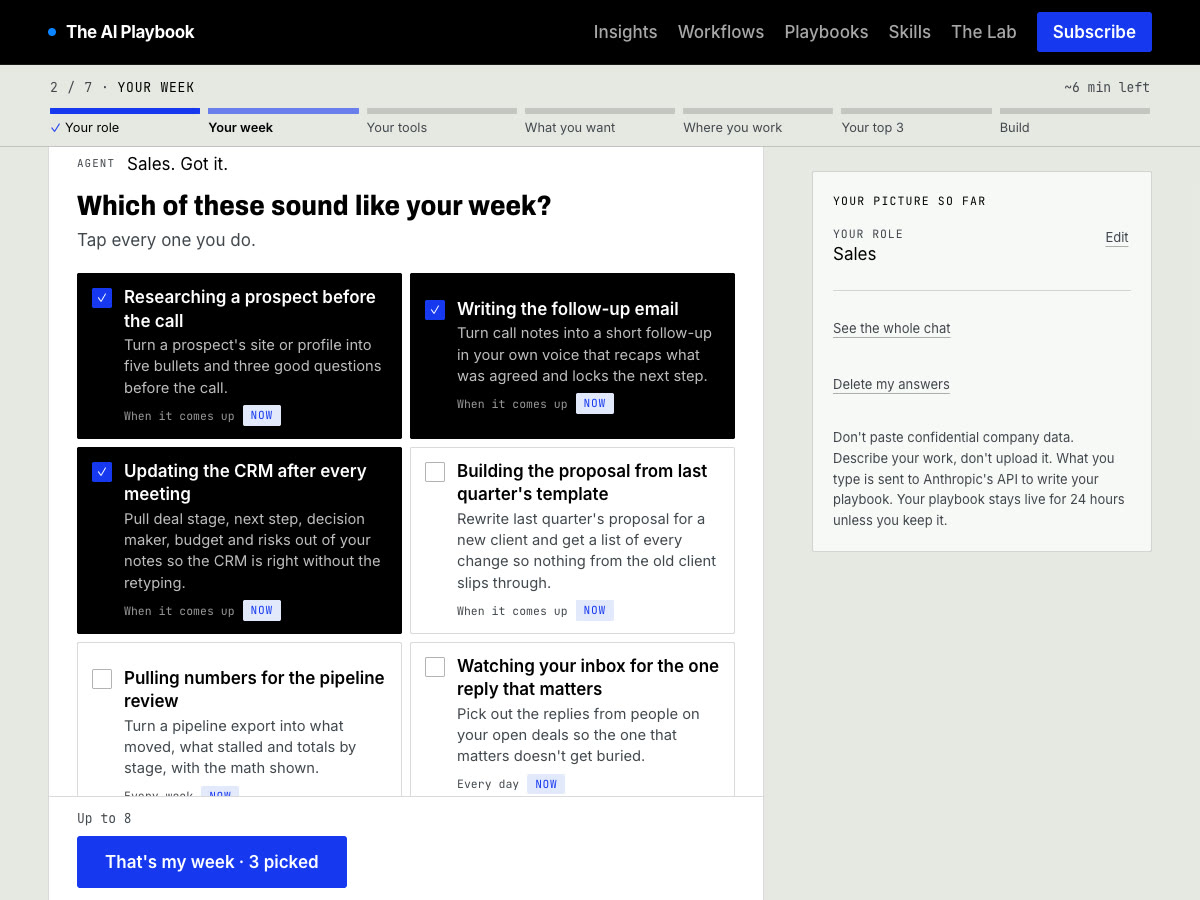
Then I put a short questionnaire in front of it. You pick your role and tap through a few questions: the work that eats your week, the tools you already use, and what you want back. Here's step 2 for a salesperson. You tap the work that sounds like your week:
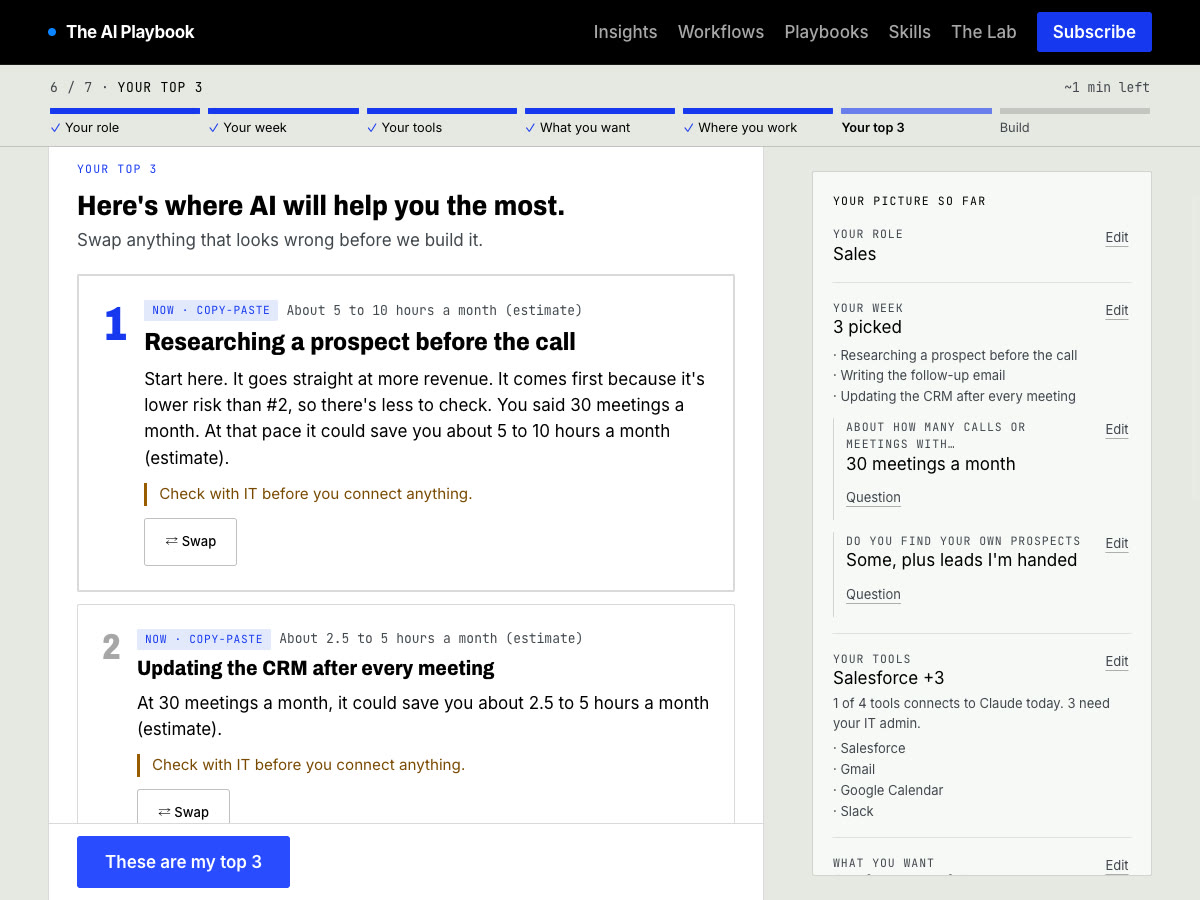
It ranks the catalog against your answers and gives you your top three, each with a prompt you can copy and paste today and the steps to turn it into an agent later. Here's what that looked like for the salesperson above, with the time estimate built from their own answers:
It takes about 8 minutes and it's free. You give an email to see your playbook, and the link stays live for 24 hours, so build it when you have time to use it.
Two examples from the catalog
If you're in sales: researching a prospect before the call. It usually takes 10 to 20 minutes per call: skim the site, look the person up, dig through the CRM, jot a few questions. Here's the card from the playbook the salesperson above got:
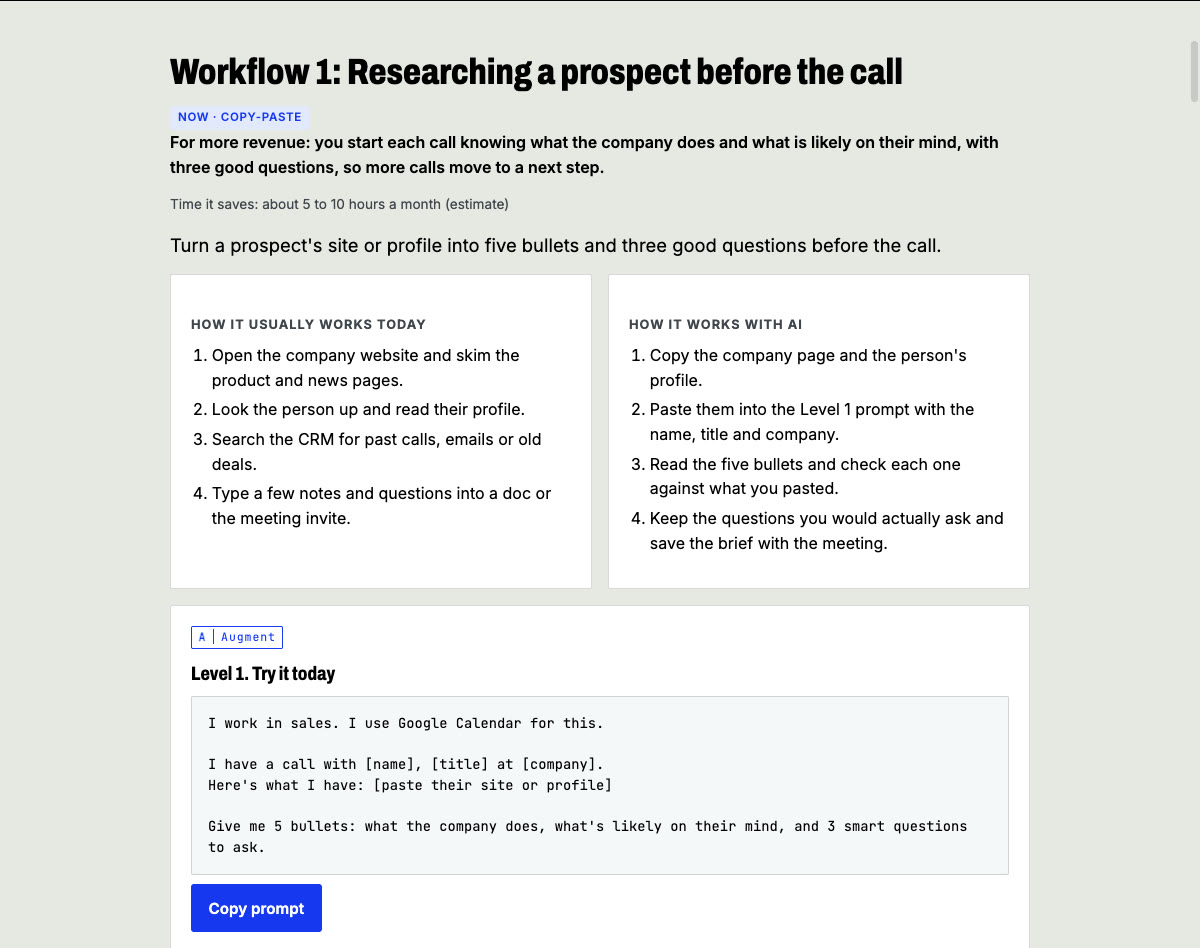
The prompt is tailored to your answers. That's why it opens with the role and the tool you said you use:
I work in sales. I use Google Calendar for this.
I have a call with [name], [title] at [company]. Here's what I have: [paste their site or profile]
Give me 5 bullets: what the company does, what's likely on their mind, and 3 smart questions to ask.
Every workflow also tells you where it goes wrong and what to check. For this one: before the call, read each bullet against the page you pasted and delete anything Claude couldn't have known from it. The failure it warns about is the brief that mentions a funding round or a new exec that's nowhere in your source, and you bring it up on the call.
If you manage people: the weekly update to your boss. 15 to 30 minutes every week, usually sent later than you meant to. The prompt:
Turn these notes into a weekly update for my boss: [paste notes]
Max 150 words. Lead with what changed and what I need from them. Ask me 3 questions first if anything is unclear.
The checkpoint is to read the draft line by line against your own notes. The failure it names is specific: the update says a feature shipped when your notes said it went to a small test group, your boss repeats it upward, and you spend Monday walking it back.
Those checkpoints are the point. Workslop happens when nobody owns the check. Every workflow in the catalog says who checks what before anything leaves your hands. Each one also tells you how to measure it. For prospect research, you time your prep on the next five calls before you start, and then watch how many first calls end with an agreed next step. That's the same kind of before-and-after Microsoft ran, at the size of one person's week.
From there, each one goes a level deeper: a Claude Project with your own context and connectors, then a spec for an agent that does it on a schedule. You don't need the deeper levels to get the time back. The prompt alone does that.
If you run a team
Build yours first. Then share it. You can send it to up to 10 people right from the page. Ask each of them to build their own and bring their top three to your next staff meeting.
You'll come out with a map of where AI pays off on your team, built from the work your people actually do. Give it a month and check it the way Microsoft did: did the time come back on those specific jobs? That's an ROI question you can answer.
Come follow along
I'm posting short videos most days and four longer ones this week. They're quick takes on AI at work from the inside of a real company.
Instagram: @TextAgent.io YouTube: @textmyagent
Build your playbook, and tell me what came up as your number one.
Keith